Versions History — Track, Compare and Publish Agent Changes
Written By Anand Raj
Last updated 24 days ago
Every change to your agent is tracked as a version. From the Versions panel in the Agent Builder you can see what is live, what is still a draft, who changed what and when — and compare any two versions side by side before you publish.
Note: If you are a direct business user and are not familiar with technical workflow configuration, do not make changes to the workflow. Contact your agency or raise a support ticket so the team can investigate and make the necessary changes.
Opening Versions
Open your agent in the Agent Builder and click the version badge (for example V2) in the top toolbar. The Versions panel slides in from the right with two sections:
Drafts — work in progress that is not live yet. Each draft shows which version it was created from (e.g. Draft (V5) — From V2).
Published — every release that has gone live. The one currently serving calls is marked Current.

Full version tracking
Nothing is overwritten. Each time you save, your changes live in a draft; each time you publish, a new published version is created. Older published versions stay in the list, so you can always look back at exactly what your agent was doing at any point in time.

Timestamped change log
Every entry in the list shows:
Version number — e.g. V3.
Release name — the name given at publish time (e.g. V3 — New new changes).
Timestamp — the exact date and time it was published.
Author — the user who published it, or System for platform-generated versions such as the initial V1.
Status — Published, Current or Drafts.
Pre-publish issue detection
Before a draft can go live, the system scans your whole workflow and flags anything that looks wrong. If issues are found, the toolbar shows an issues button (e.g. 5 issues) instead of a clean publish state. Click the button to see every issue grouped by node.
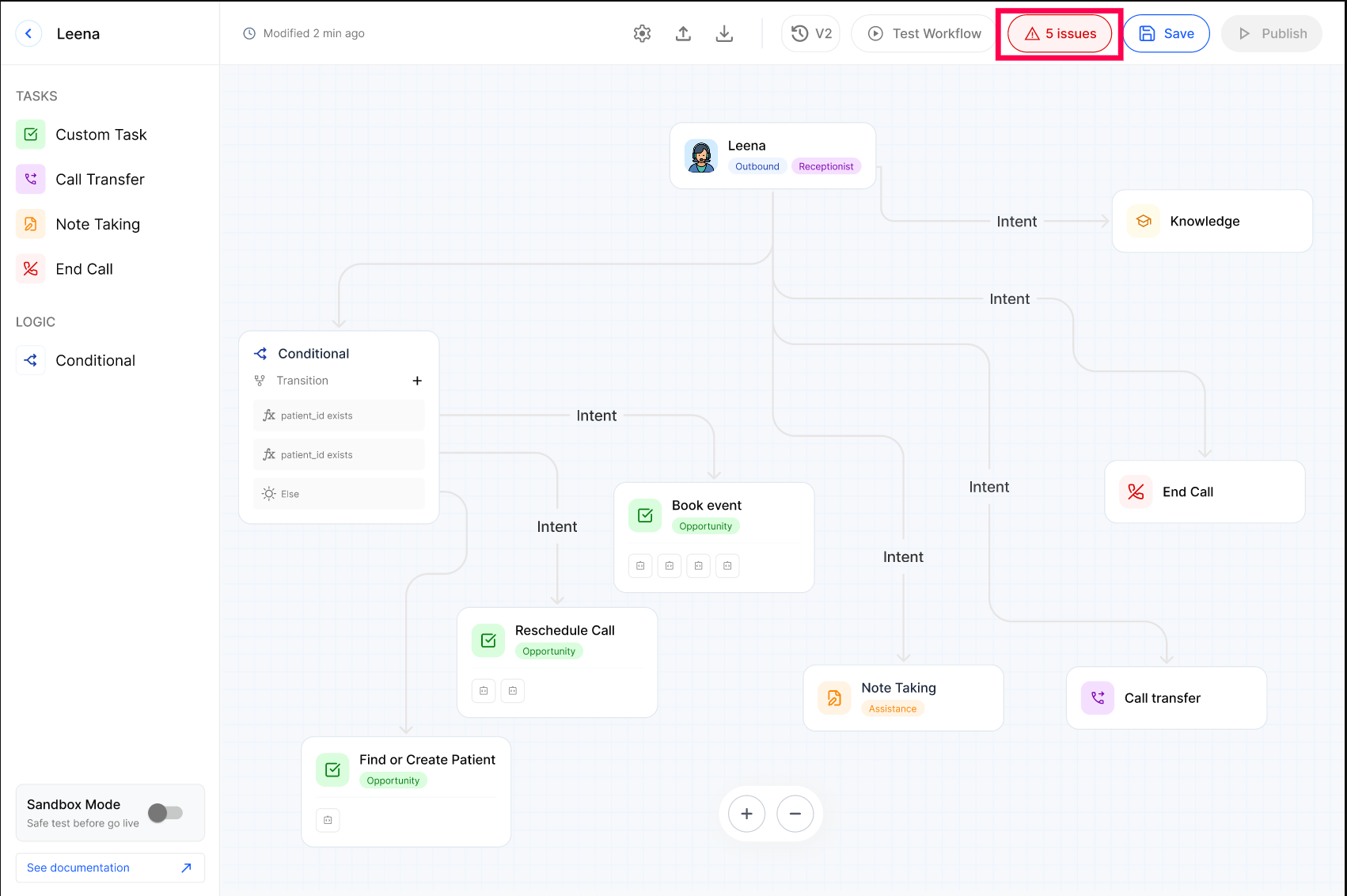

Here are a few examples of what the system checks for:
Missing worksheet. A Note Taking node has no worksheet attached, so the agent doesn't know what fields to capture.
Unused tool. A tool like create_appointment is selected but never mentioned in the prompt.
Lightweight prompt. The prompt is too short to cover tone, objections, and edge cases.
Missing workflow. There's no fallback path, for example when the calendar has no open slots.
Typos. A misspelling in the prompt, flagged with its line number.
This list isn't complete. The system runs other checks too, and each one comes with a short suggestion telling you how to fix it.
Issues fall into two categories. Errors block publishing: if even one error shows up, the Publish button stays disabled until you resolve it. Warnings don't block publishing, but you should review them before you go live.
Testing a draft safely
Use Test Workflow to try a draft before it goes live. The test runs against the draft you are editing and does not affect the currently published version — live calls keep using the Current version until you publish.
Named releases and diff views
Click Publish and a panel slides in from the right where you describe the release before it goes live:
Name — the version number (e.g. V5-) is filled in for you; add a short, meaningful title such as "Agent Leena New Release" . This is what shows up in the version list later.
Version Description — an optional longer note explaining what changed and why, so anyone reviewing the history later has the full context.
Show Changes — expand this to review exactly what's being published before you confirm.

Use Cancel to close the panel without publishing — your draft stays exactly as it was. Under Show Changes, changes are presented in two ways:
Semantic Diff — a plain-language summary of what was added, removed or changed, grouped by node or workflow (e.g. Book_Appointment — 1 changed).

JSON Diff — the full line-by-line technical detail, with removed lines in red and added lines in green.

Comparing any two versions
You don't have to be publishing to compare. In the Versions panel, click the three-dot menu on any entry and choose Compare Version. Then pick the two versions you want in the dropdowns — published or draft, in any combination — and switch between Semantic Diff and JSON Diff.


The same menu also lets you:
Create Draft — start a new draft from an existing published version (useful for rolling back or branching off an older release).
Delete Version — remove a draft you no longer need.
Frequently Asked Questions
Do I need to turn Agent History Logs on?
Do I need to turn Agent History Logs on?
No. Logging is automatic for all important events — there's nothing to configure.
Can I restore an old value automatically?
Can I restore an old value automatically?
Not yet. You can see the previous value in the log and re-apply it manually in the relevant setting.
Who can see Agent History Logs?
Who can see Agent History Logs?
Anyone with access to the Agent Builder can open Agent History Logs and see the change trail.
How far back do logs go?
How far back do logs go?
Logs are retained for the lifetime of the agent. Older entries stay accessible from the same panel.
Can I add custom events to the log?
Can I add custom events to the log?
If you need a specific event tracked that isn't already logged, contact support and we'll evaluate adding it.
More in Identity & Conversation Flow:
Was this helpful?
Still need help? Ask the team