How Do You Register an A2P Campaign?
Set up your A2P campaign with the required consent details, messaging use case, and sample messages for verification
Written By Maruf Ansari
Last updated About 2 hours ago
Once your brand is approved, register a campaign to tell carriers what kind of messages you send, how people agree to receive them, and what those messages look like. An approved campaign, linked to your numbers, lets your AI agent send SMS without being filtered.
For background on A2P and the campaign list, see A2P Campaign.
Add-on required: Your Business must activate the A2P 10DLC Registration add-on before you can access A2P brand and campaign registration. See Add-Ons
Before you start
Your brand must be approved. See Register Your Brand.
Know how people opt in to your messages (website form, printed form, verbally, or at the front desk).
Have a public URL ready for your opt-in or consent documentation page, if your consent method needs one.
Prepare at least two example messages that include your brand name and opt-out wording.
Important notes
Each campaign requires an initial 3-month commitment. If you cancel before it ends, you will continue to be charged for the remaining commitment period.
A $250 non-use fee applies if the number is not linked to an active campaign within 60 days.
Keep everything consistent. Reviewers read your use case, campaign description, consent flow, and sample messages together. If one of them describes messages the others don't, the campaign is likely to be rejected.
Content carriers reject
Campaigns with the following content are rejected whatever use case you choose:
Debt collection of any kind, including payment reminders that read like collections.
High-risk financial content, such as loans, payday lending, credit repair, debt relief, or cryptocurrency.
Sex, hate, alcohol, firearms, tobacco, or cannabis content without age-gating.
Lead generation, affiliate marketing, or messaging on behalf of a third party.
More than one brand in a single campaign.
Open the registration form
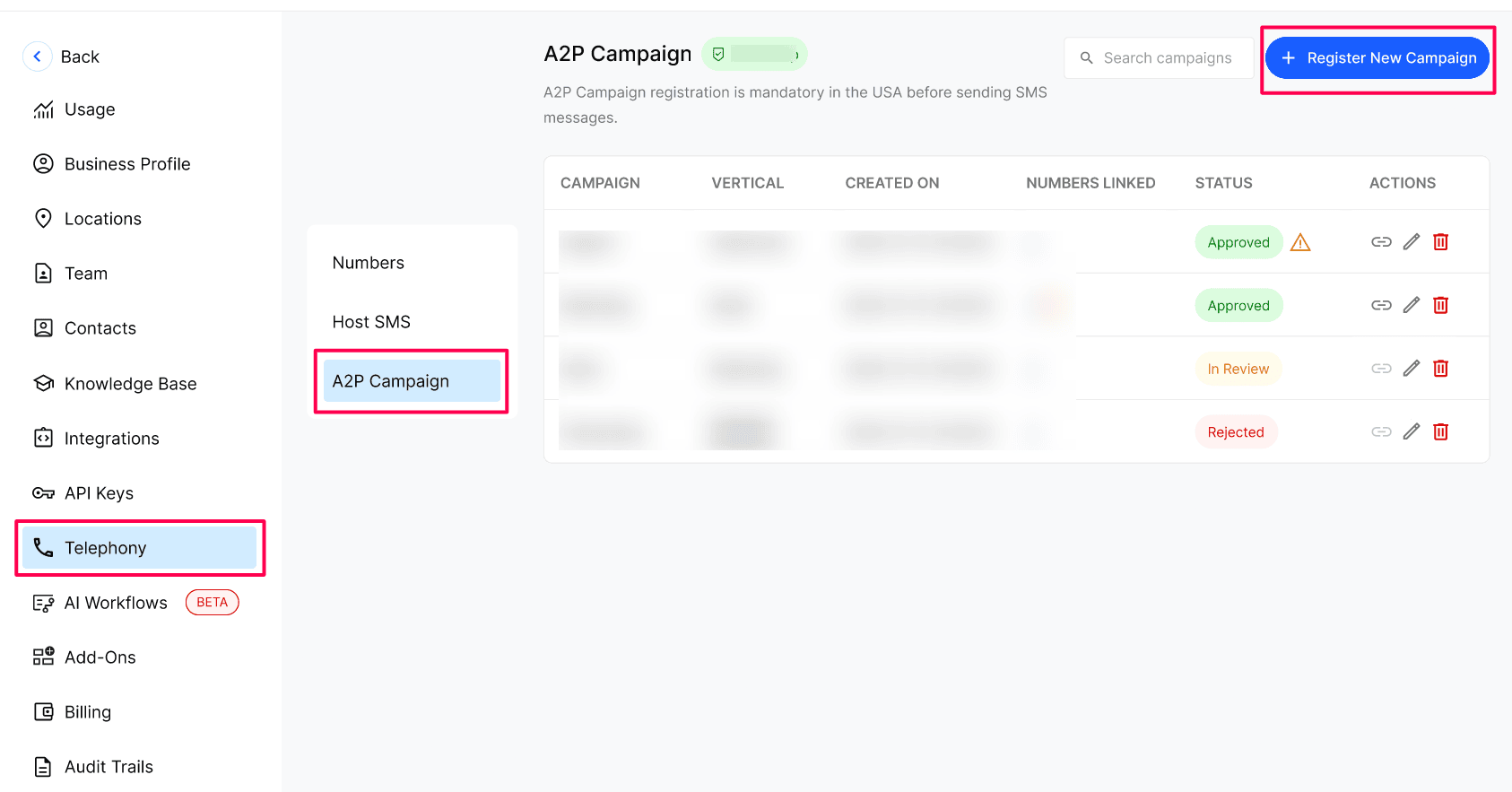
Open Telephony → A2P Campaign → Click Register New Campaign.
The Register A2P Campaign panel opens with five tabs: Campaign Type, Consent & Details, Sample Messages, Attributes, and Compliances. Click Next to move forward, Back to return, or Cancel to close.
Step 1: Campaign Type
Choose the campaign type that fits your messaging volume.
Note (Low Volume Mixed): You can send up to 2,000 messages a day per brand to T-Mobile, but you're limited to 75 SMS message segments a minute on the AT&T network. You cannot use vetting to get a higher throughput on these campaigns.
Step 2: Consent & Details
Describe the campaign
Write a strong campaign description
Reviewers must be able to tell who is sending, to whom, what kinds of messages, and how recipients agreed. Aim for three to six sentences. Very short or generic descriptions are usually rejected.
Name your Business (and legal name, if different).
Name the message types you will actually send — don't list everything you might ever send.
Say who receives them, for example patients with a booked appointment.
Say how people opt in. If consent is collected on a call, say "automated AI phone assistant" plainly — hiding it reads as evasive.
State that every message identifies your Business and includes opt-out instructions (reply STOP).
Example:
"Bright Smile Dental uses this campaign to send appointment confirmations, appointment reminders, reschedule notices and post-visit follow-ups to patients who have booked an appointment with our office. Patients opt in verbally when they book by phone with our automated AI phone assistant, or by checking the SMS consent box on our online booking form at https://www.brightsmiledental.com/book. Messages are informational only. Every message identifies Bright Smile Dental and includes opt-out instructions (reply STOP)."
Tip: Appointment reminders fit best under a Mixed or Low Volume Mixed campaign, alongside any other message types you send.
Choose how people give consent
Under Messaging Opt-In Agreement, answer "How do your patients primarily provide messaging consent?" Each method asks for different proof:
Include the required disclosures
Your opt-in agreement, consent page, or verbal script must let people give their phone number and express explicit consent (for example, via checkbox or signature field), while communicating these disclosures:
Consent to receive SMS from your Business for appointment reminders, account notifications, and general two-way communication.
Msg frequency varies. Msg & data rates may apply.
Reply HELP for support. Reply STOP to opt out.
See our privacy policy for more information.
Reviewers also look for:
Your Business name and the kind of messages people will get.
A frequency statement, such as "Msg frequency varies" or "up to 4 msgs/month".
The customer's confirmation — their spoken "Yes" or their checked box.
Links to your Privacy Policy and Terms & Conditions.
For web forms: the SMS checkbox is optional, unchecked by default, not a condition of purchase, and separate from email consent and from accepting your Terms. Transactional and marketing texts each need their own checkbox.
Click Need Help? See Our Opt-In Template for a ready-made example.
Example verbal opt-in script
If your AI agent collects consent on a call, paste the exact script it speaks. For example:
"Before we finish up, would it be alright if [Business Name] sends you text messages about [your appointment]? Message and data rates may apply. Message frequency varies. You can opt out at any time by replying STOP, or reply HELP for help. Our Terms are at https://www.[yourdomain].com/terms and our Privacy Policy is at https://www.[yourdomain].com/privacy. Do I have your permission to send you these texts? Please say yes or no."
Explain that consent is recorded only after an explicit "yes", that the first text is a confirmation message, and that no texts are sent if the caller says no or doesn't answer. If a web form only requests a callback, say that submitting it does not opt the person in to SMS.
Describe the message flow and confirm
Complete Message Flow (required). It explains where people provide their number, the exact consent wording they see, and links to your Privacy Policy, Terms & Conditions, and screenshots. A template is pre-filled — replace the bracketed placeholders.
Tick I verify my Messaging Opt-In Agreement contains the disclosures above and allows my patients to enter their phone number and grant consent.
Click Next.
Step 3: Sample Messages
Add examples of the messages you will send. Sample 1 and Sample 2 are required; Sample 3 is optional.
Tip: Include your brand name at the start of each message and always include "Reply STOP to unsubscribe" to satisfy carrier requirements.
As you type, each sample is checked and shows green badges when it passes:
Brand name present
Opt-out language present
Each sample should:
Be roughly 20 to 200 characters. Anything over 160 characters is sent as two message segments — recount after replacing placeholders, since a long Business name adds length.
Show variable values in square brackets, such as
[Date],[Time], or[Agent Name].Use only links on your own domain. Public link shorteners such as bit.ly or tinyurl are rejected.
Match your use case and description — for example, no discount offers in a support-only campaign.
Use the same frequency wording as your consent text, such as "Msg frequency varies".
A good pairing is one opt-in confirmation plus one message that shows your real content:
"[Business Name]: You're opted in to receive appointment reminders by text. Msg & data rates may apply. Msg frequency varies. Reply STOP to cancel, HELP for help."
"Reminder from [Business Name]: you have an appointment on [Date] at [Time], at [Address]. Need to reschedule? Call [Phone]. Reply STOP to opt out."
Example:
"sbs: Your appointment is confirmed for Feb 12 at 3:00 PM, scheduled via our AI voice assistant. View details in your dashboard. Msg & data rates may apply. Reply HELP for help, STOP to unsubscribe."
Click Next to continue.
Step 4: Attributes
Under Campaign Attributes, tell carriers how people opt in, opt out, and get help, and what your messages contain.
Opt-in
Answer "Are you collecting and processing consumer opt-in?" If you select Yes, complete:
Subscriber opt-in keywords — the word(s) a customer can text to opt in, for example START or YES.
Subscriber opt-in message — the confirmation message sent when a customer agrees to receive texts.
Opt-out
Answer "Are you collecting and processing consumer opt-out?" If you select Yes, complete:
Subscriber opt-out keywords — the word(s) a customer can text to unsubscribe. Defaults to STOP; pre-filled with STOP, STOPALL, UNSUBSCRIBE, CANCEL, END, QUIT.
Subscriber opt-out message (required) — the confirmation sent when a customer unsubscribes, for example "<Brand Name>: You have successfully been unsubscribed. You will not receive any more messages from this number."
Help
Answer "Have you implemented a response to the HELP keyword informing customers of how they can contact the message sender?" If you select Yes, complete:
Subscriber help keywords — the word(s) a customer can text to request help. Defaults to HELP; pre-filled with HELP, INFO.
Subscriber help message (required) — the message sent when a customer asks for help, for example:
"<Brand Name>: For assistance contact <support email>. Msg & data rates may apply. Reply STOP to unsubscribe."
Content questions
Answer Yes or No to each:
Will the campaign include content related to direct lending or other loan arrangements?
Are you using an embedded link of any kind?
Are you using any embedded phone number beyond the contact number in the HELP response?
Will the campaign include any age-gated content as defined by carrier and CTIA guidelines?
Answer honestly — your answers should match your sample messages. Click Next.
Step 5: Compliances
Provide your Privacy Policy and Terms & Conditions. Each section shows a Prepared badge once it's complete.
Privacy Policy
Your Privacy Policy should specify what details you collect and how customer data is processed.
Click Need Help? See Our Privacy Policy Template if you need an example.
Enter your Privacy Policy URL. It must be live, start with
https://, and be on your own domain.Tick I verify my Privacy Policy contains the disclosures above. A green Privacy Policy, Prepared confirmation appears.
Your Privacy Policy must state that mobile opt-in data is never shared. Add a clause like this to the section about sharing data with third parties:
"No mobile information will be shared with third parties or affiliates for marketing or promotional purposes. All the above categories exclude text messaging originator opt-in data and consent; this information will not be shared with any third parties."
Link to a page where this clause is visible straight away — not a tab or collapsed section inside a long policy. Reviewers who can't find it will reject the campaign. A short, dedicated SMS privacy page works well.
Terms & Conditions
Your Terms & Conditions should give people SMS disclosure covering:
Types of messages
Texting cadence
Message and data rate notices
Privacy policy links
Opt-out instructions
Enter your Terms & Conditions URL.
Tick I verify my Terms & Conditions contain the disclosures above. A green Terms & Conditions, Prepared confirmation appears.
Step 6: Submit and confirm payment
Click Submit Campaign.
Review the Confirm Payment dialog:
Vetting fee — a one-time fee, due today (for example, $15.00).
Monthly campaign cost — the recurring price of your campaign type.
Due Today — the amount charged now.
Click Yes Sure to pay and submit, or Cancel to go back.
Make your agent collect consent the same way
Your campaign promises a specific consent process, so your AI agent must follow it on every call:
Speak the exact verbal opt-in script you submitted before sending any text.
Send texts only after a clear "yes". If the caller says no or is unsure, send nothing and don't ask again on that call.
Send the confirmation message first, and include your Business name and "Reply STOP to opt out" in every text.
If the messages you actually send don't match your sample messages, the number can be suspended. If you're unsure how to set this up, contact your Agency.
Expected result
Your campaign appears in the campaign list with an In Review status. Once it changes to Approved, link one or more phone numbers to start sending messages.
Troubleshooting
Frequently Asked Questions
Which campaign type should I choose?
Which campaign type should I choose?
Choose Low Volume Mixed if you send under 15,000 messages a month and they aren't time-sensitive. Choose Mixed for campaigns covering 2 to 5 standard use cases.
Is there a minimum commitment?
Is there a minimum commitment?
Yes. Each campaign requires an initial 3-month commitment. Cancelling early still incurs charges for the remaining period.
What is the $250 non-use fee?
What is the $250 non-use fee?
It applies if the number is not linked to an active campaign within 60 days.
Do I need a website to register a campaign?
Do I need a website to register a campaign?
Not always. With Verbal & Text, the verbal opt-in script is your proof of consent and no URL is needed. Other methods require a public page.
Why must every sample message include my brand name and STOP wording?
Why must every sample message include my brand name and STOP wording?
Carriers require it. Messages without them are more likely to be rejected or filtered.
Can I use link shorteners in my messages?
Can I use link shorteners in my messages?
No. Public shorteners such as bit.ly or tinyurl are rejected. Use links on your own domain.
My AI agent collects consent on calls. What should I submit?
My AI agent collects consent on calls. What should I submit?
Choose Verbal & Text, paste the exact script your agent speaks, and make sure the agent uses that same script on every call before sending texts.
What must my Privacy Policy include?
What must my Privacy Policy include?
A clear statement that mobile opt-in data and consent are never shared with third parties, on a page where reviewers can see it without clicking tabs or expanding sections.
Was this helpful?
Still need help? Ask the team