What Do Active, Past Due, Inactive and Archived Business Statuses Mean in Kickcall?
Understand Kickcall business account statuses and their access, call-service and data implications before reviewing payment issues or changing status
Written By Maruf Ansari
Last updated 10 days ago
Business Account Statuses Overview
Business Account Statuses allows Agency users to monitor and manage a Business's account status, platform access, and AI Agent services. The four statuses—Active, Past Due, Inactive, and Archived—indicate the Business's payment and service conditions, including whether it can access the platform or receive AI Agent-handled calls. You can understand how statuses change automatically based on billing or are managed manually by the Agency when payments are handled externally. Understanding these statuses helps prevent unintended service interruptions and ensures archiving is not used as a temporary pause.
Important notes
Archived permanently deletes all Business data and cannot be recovered. This includes call logs, recordings, configurations, Knowledge Base and Audit Trails.
With built-in Stripe billing, statuses are managed automatically from payment events. Manual overrides are permitted at the Agency’s own risk and can put status out of sync with billing. External billing requires the Agency to track payments and maintain status manually.
Before you start
Open the Business’s Business Profile Settings and confirm the Business Code.
Confirm whether the Agency uses built-in Stripe billing or tracks payments outside Kickcall.
Review or change Account Status
Review payment history before making a status change.
Find the Account Status selector at the top right of Business Profile Settings.
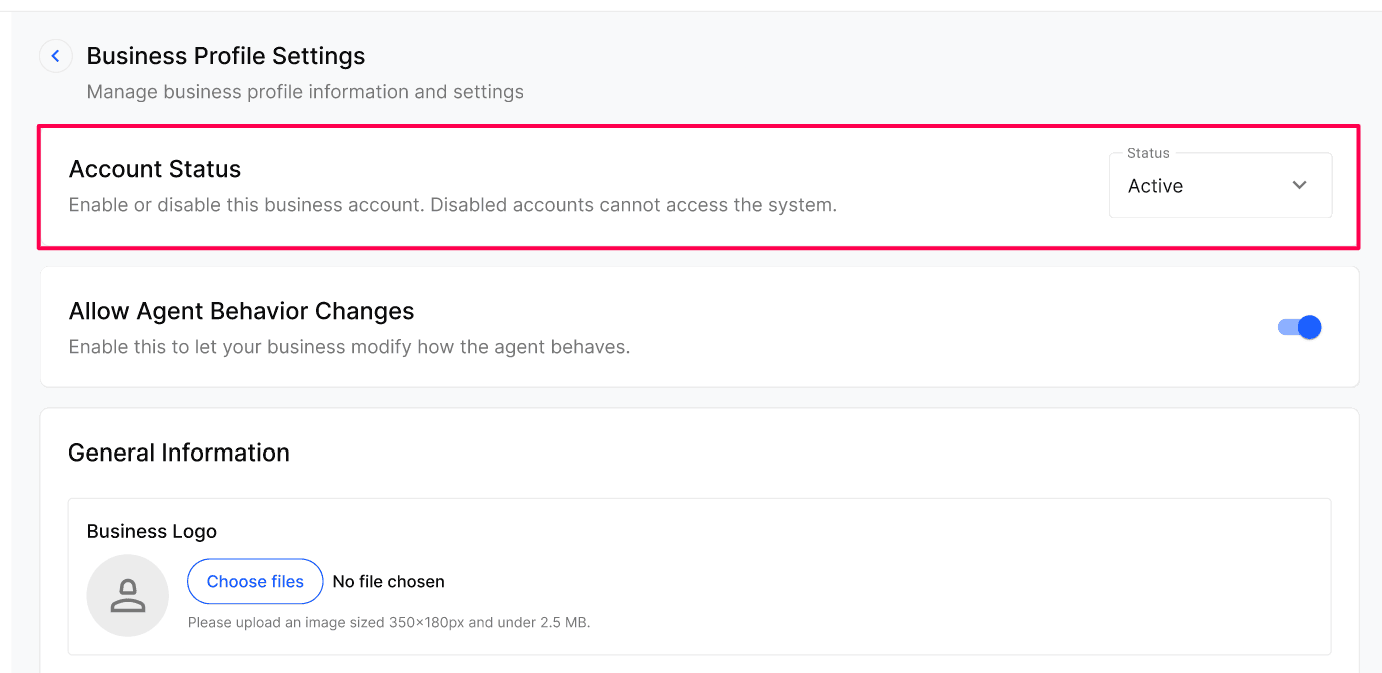
For externally managed billing, select the status that matches the Business’s payment situation.
For built-in Stripe billing, prefer automatic payment-event management over a manual override.
Verify the resulting status and access or service behavior.
Status reference
Expected result
You can identify whether the account is live, payment-restricted, inactive or permanently archived. Clearing a Past Due payment automatically returns the Business to Active and resumes service.
Verify the result
Review the Account Status shown on the profile and in Businesses.
For a cleared Past Due payment, verify Active status and place a controlled test call to check service resumed.
Review the status-change notification sent to the primary contact.
For an Inactive account, ask the Agency Admin to review restoration requirements before promising login or previously assigned resources.
Troubleshooting
Recovery or rollback
Pay a Past Due balance to restore Active status automatically. For Inactive accounts, contact the Agency Admin; previously released numbers and integration credentials may require re-provisioning. Archived accounts cannot be restored.
Frequently Asked Questions
How long does a business stay in Past Due before moving to Inactive?
How long does a business stay in Past Due before moving to Inactive?
Until the end of the following month. Past Due begins 7 days after bill generation; if the bill is still unpaid by the next month-end, the account is moved to Inactive.
What happens to phone numbers and integrations when a business goes Inactive?
What happens to phone numbers and integrations when a business goes Inactive?
Their integration credentials and phone numbers are released. If the business reactivates later, those numbers and credentials may need to be re-provisioned.
Can I recover a business after archiving it?
Can I recover a business after archiving it?
No. Archiving permanently deletes all data with no recovery option. Use it only when you are certain the business will not return.
Will the business owner be notified when the status changes?
Will the business owner be notified when the status changes?
Yes. Status changes trigger notifications to the business's primary contact so they know why service has paused or resumed.
Should I manually change status if I'm on Kickcall Stripe Billing?
Should I manually change status if I'm on Kickcall Stripe Billing?
Generally no — the system keeps the status in sync with payments. Manual overrides are allowed but use them only when you fully understand the billing impact.
Related articles
Businesses & Actions
Business Billing Information & Packages
Configure Stripe
Manage Business Details & Configurations
Was this helpful?
Still need help? Ask the team