Business Onboarding Statuses
Written By Anand Raj
Last updated 3 months ago
Every onboarding in Kickcall moves through a clear set of statuses — from the moment the form link is shared right through to a fully stable, live AI agent. Some statuses are updated automatically by the system, others are updated manually by your agency team to track how the agent is maturing. This article explains what each status means and how to use them.
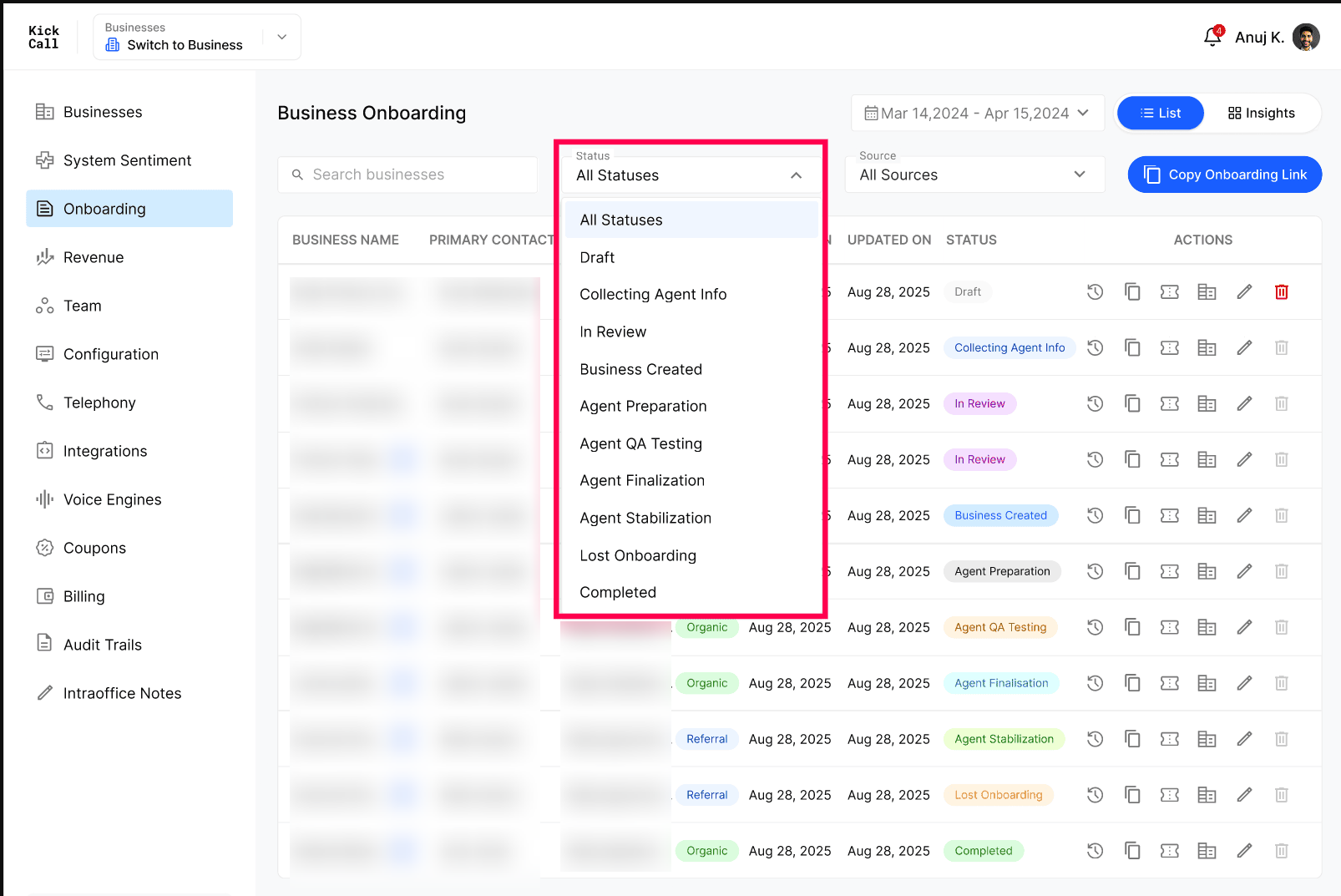
Two types of statuses
Automatic (system-driven) — from Payment Pending through to Business Created. These are updated automatically by the system based on Business and Agency user activities — as the business completes payment, fills the form, submits it for review and the agency runs Business Setup.
Manual (agency-driven) — from Agent Preparation through to Completed. Once the business is created, your agency team updates the status manually as the AI agent is prepared, tested, finalized, stabilized in production and finally signed off as complete.
Status meanings
1. Draft (automatic)
Onboarding form is started by the Business but payment is not done yet. This is the only status in which the onboarding can be deleted from the list.
2. Collecting Agent Info(automatic)
The Business has started providing Agent Training Info but has not sent it for review yet.
3. In Review(automatic)
The form has been submitted. The agency team is reviewing the captured information and assisting with anything technical the business cannot do alone (integration credentials, SIP setup, knowledge base review, etc.) before pushing to Business Setup.
4. Business Created(automatic)
The agency has run Business Setup in one click and the business now exists in the Businesses module with all default configurations applied. From here, statuses become manual.
5. Agent Preparation(manual)
The agency is preparing the AI agent — tuning prompts, configuring workflows, wiring integrations and getting the knowledge base ready for real calls.
6. Agent QA Testing(manual)
Internal QA on the agent — test calls, scenario coverage, transfer logic, booking flows, edge cases. Issues found here are fixed before exposing the agent to real customers.
7. Agent Finalization(manual)
Final polish based on QA findings. The agent is locked in for go-live: final prompt, final voice, final telephony and final billing package confirmed with the business.
8. Agent Stabilization(manual)
The agent is live (typically first during the business's non-working hours) and the agency is monitoring real calls, catching issues and improving the agent continuously. This phase typically lasts around 3 months before the agent is fully dialed in.
9. Lost on Onboarding(manual)
Businesses that dropped out of the onboarding process before completion.
10. Completed(manual)
The agent is stable, performing as expected and the business is fully live. The onboarding is officially closed.
Why manual statuses matter — automate customer engagement
The Agency team can update these manual statuses from the Internal Process step of the onboarding. This step is enabled only once the onboarding reaches the Business Created status — before that, the onboarding is still being driven automatically by the system.
The manual statuses are not just for internal tracking. They are extremely useful for automating customer engagement as the agent matures. Today Kickcall supports the Customer.io third-party integration — you can trigger emails, in-app messages and SMS automatically whenever a business moves between statuses.
A few common examples:
When status moves to Agent Preparation, send a welcome email letting the business know setup has started.
When status moves to Agent QA Testing, notify the business that internal testing is in progress.
When status moves to Agent Stabilisation, send a "your agent is going live tonight" message and share monitoring expectations.
When status moves to Completed, trigger a sign-off email, a CSAT survey or a referral request.
See Configure Customer.io for how to wire these triggers up.
Frequently Asked Questions
Which statuses change automatically and which do I update myself?
Which statuses change automatically and which do I update myself?
Payment Pending → Business Created is automatic on the basis of Business and Agency user activities (payment, form submission, review and Business Setup). Everything from Agent Preparation onwards is updated manually by your agency team.
Can I delete an onboarding once payment is confirmed?
Can I delete an onboarding once payment is confirmed?
No. Delete is only enabled in Payment Pending. After that, the record is kept for audit purposes.
How long does Agent Stabilisation usually take?
How long does Agent Stabilisation usually take?
Around 3 months on average, during which the agency continuously monitors calls and refines the agent before marking it as Completed.
Can I trigger customer emails when status changes?
Can I trigger customer emails when status changes?
Yes. Connect Customer.io from the third-party configuration and use the status transitions as triggers for your engagement campaigns.
What happens to the business if I never mark the onboarding as Completed?
What happens to the business if I never mark the onboarding as Completed?
Nothing breaks — the business continues to operate normally. The Completed status is mainly for your own tracking and to drive end-of-onboarding automations.
More in Onboarding
Was this helpful?
Still need help? Ask the team