Business Audit Trails Overview
Written By Anand Raj
Last updated 4 months ago
The Audit Trails module inside the Business Portal gives you a complete, time-stamped history of everything happening on your Business — who logged in, what was changed on your agent, which configurations were updated, when your Agency accessed your Business, and even when our automated Guardian AI checked in to review your account.
Audit logs are written automatically by the system. They cannot be edited or deleted by any Business user, Agency user, or admin — which is exactly what makes them trustworthy when you need to investigate something on your Business.
Opening Audit Trails
From the left sidebar of the Business Portal, click Audit Trails. You will see a chronological table of every recorded activity on your Business, with filters for date range, action type, and a search box.
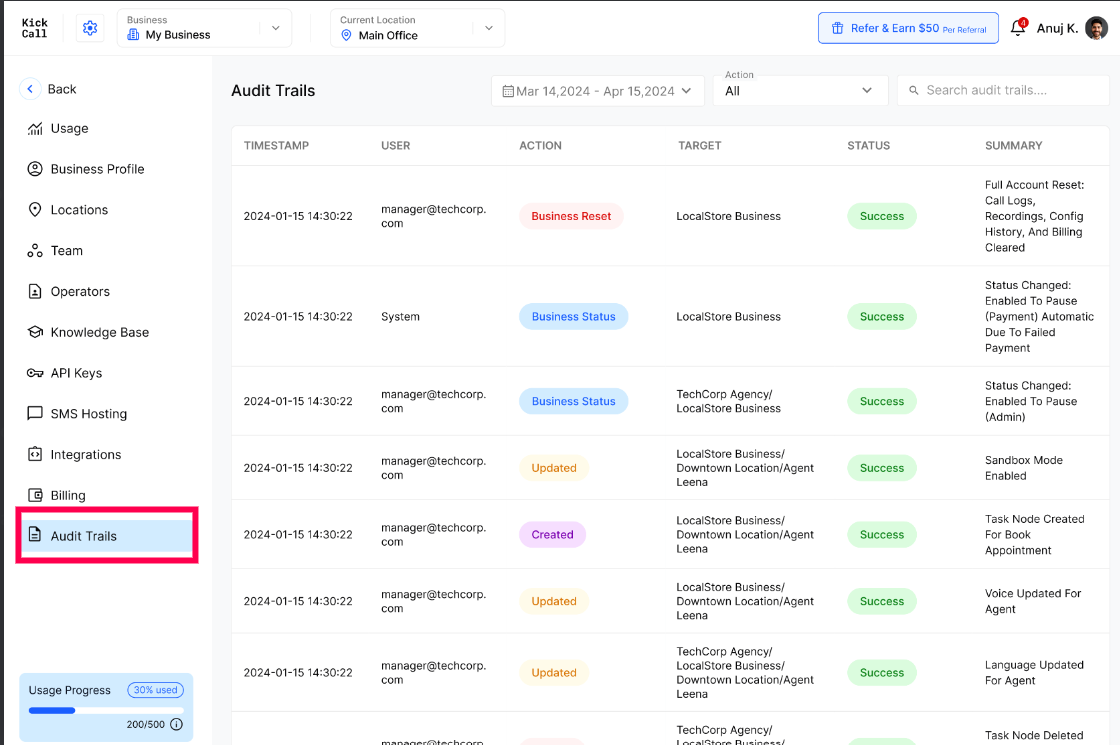
What each column means
Timestamp — exact date and time the action was recorded.
User — who performed the action. This can be a Business user (by email), an Agency user that accessed your Business, System for automated events (for example, auto-pause due to failed payment), or Guardian AI for our automated review agent.
Action — the type of activity, e.g. Logged in, Business Checked in, Agency Checked in, Business Status, Business Reset, Created, Updated, Deleted.
Target — what the action affected: your Business, a specific Location, an Agent, an integration, an API key, etc.
Status — whether the action completed successfully or failed.
Summary — a short human-readable description of what changed (for example, "Voice Updated For Agent", "Task Node Created For Book Appointment", "Post Welcome Message Is Updated In Leena").
What gets tracked on your Business
User logins — every time a Business user signs in to your Business Portal.
Business Checked in — when any user (Business user, Agency user, or Guardian AI) opens your Business Portal, so you always know who accessed your Business and when.
Agency Checked in — when one of your Agency's users accesses the Agency Dashboard in a context related to your Business.
Business status changes — Active / Pause / Past Due / Inactive transitions, including automatic ones triggered by failed payments.
Business Reset — full account resets (Call Logs, Recordings, Configuration History, Billing) with the exact scope cleared.
Agent changes — every update to your AI agent: voice, language, intents, action nodes, advanced settings, welcome message, sandbox mode toggles, etc.
Configuration changes — creation, updates and deletion of Locations, Operators, Integrations, API Keys, SMS Hosting and other Business configuration.
Note: We are continuously expanding what gets tracked. If there is a specific event on your Business you would like us to start logging, reach out to your Agency and they can request it on your behalf.
Guardian AI — automated review by our AI agent
Guardian AI is our internal AI agent that automatically logs in to your Business, reviews your records (calls, configuration, agent behavior, integrations) and flags issues as they appear — without anyone from your team or your Agency having to manually check.
Because Guardian AI logs in like any other user, every action it performs is written to your Audit Trails so you have full transparency over what it accessed and when.
Why this matters
Because audit logs are immutable and system-generated, they let your Business:
Investigate incidents — figure out exactly which user changed an agent, deleted a Location or updated the welcome message.
Hold internal team members accountable for sensitive operations like resets, deletions and key changes.
See exactly when your Agency accessed your Business and what they did while they were in.
Verify Guardian AI's automated activity on your Business.
Spot suspicious activity such as unexpected logins or repeated failed actions.
Note: Audit Trail entries are written by the system and cannot be edited or deleted by anyone — not your Business users, not your Agency, not even support. If an entry looks wrong, it reflects what actually happened — use it as the starting point for your investigation.
Frequently Asked Questions
Can anyone on my Business edit or delete Audit Trail entries?
Can anyone on my Business edit or delete Audit Trail entries?
No. Audit Trails on your Business are system-generated and immutable. No Business user, no Agency user, and no admin can modify or remove entries.
Will I see when my Agency opened my Business Portal?
Will I see when my Agency opened my Business Portal?
Yes. Business Checked in events record every time an Agency user (or Guardian AI) accesses your Business, along with the user, the target and the timestamp.
Who is Guardian AI and why does it appear in my Business Audit Trails?
Who is Guardian AI and why does it appear in my Business Audit Trails?
Guardian AI is our automated AI agent that logs in to your Business, reviews your records and configuration, and automatically reports any issues it finds to your Agency. Because it acts like a real user, every login, check-in and clean-up action it performs is logged on your Business for full transparency.
Why do some entries on my Business show "System" as the user?
Why do some entries on my Business show "System" as the user?
"System" means the action was performed automatically by the platform rather than by a person or Guardian AI — for example, auto-pausing your Business after a failed payment or moving your Business to Past Due.
How far back are my Business Audit Trails kept?
How far back are my Business Audit Trails kept?
Audit logs on your Business are retained long-term so you can investigate historical issues. Use the date range filter at the top of the Audit Trails screen to jump to a specific period.
Can I filter Audit Trails on my Business by action type?
Can I filter Audit Trails on my Business by action type?
Yes. Use the Action dropdown at the top of the screen to filter by a specific action (Logged in, Business Checked in, Updated, Deleted, Business Reset, etc.), and the search box to find entries by user or target.
Was this helpful?
Still need help? Ask the team