System Sentiment Overview
Written By Anand Raj
Last updated 17 days ago
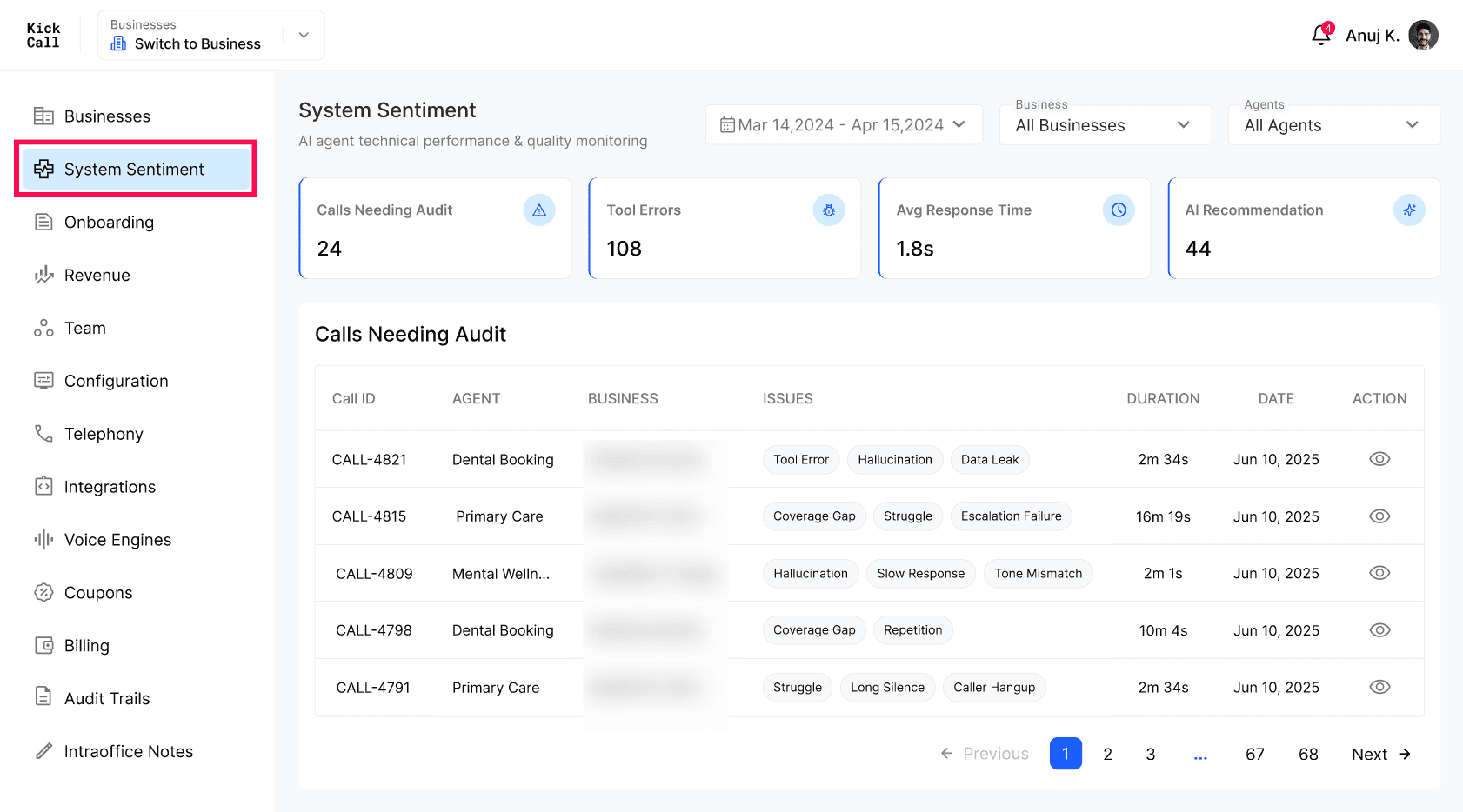
System Sentiment is the centralised monitoring area for your agency's technical performance. It brings call quality, tool performance, MCP errors, and sync health into a single screen so your team can spot issues fast and act on them — either inside the agent prompts or by reporting to Kickcall support.
Call Auditing
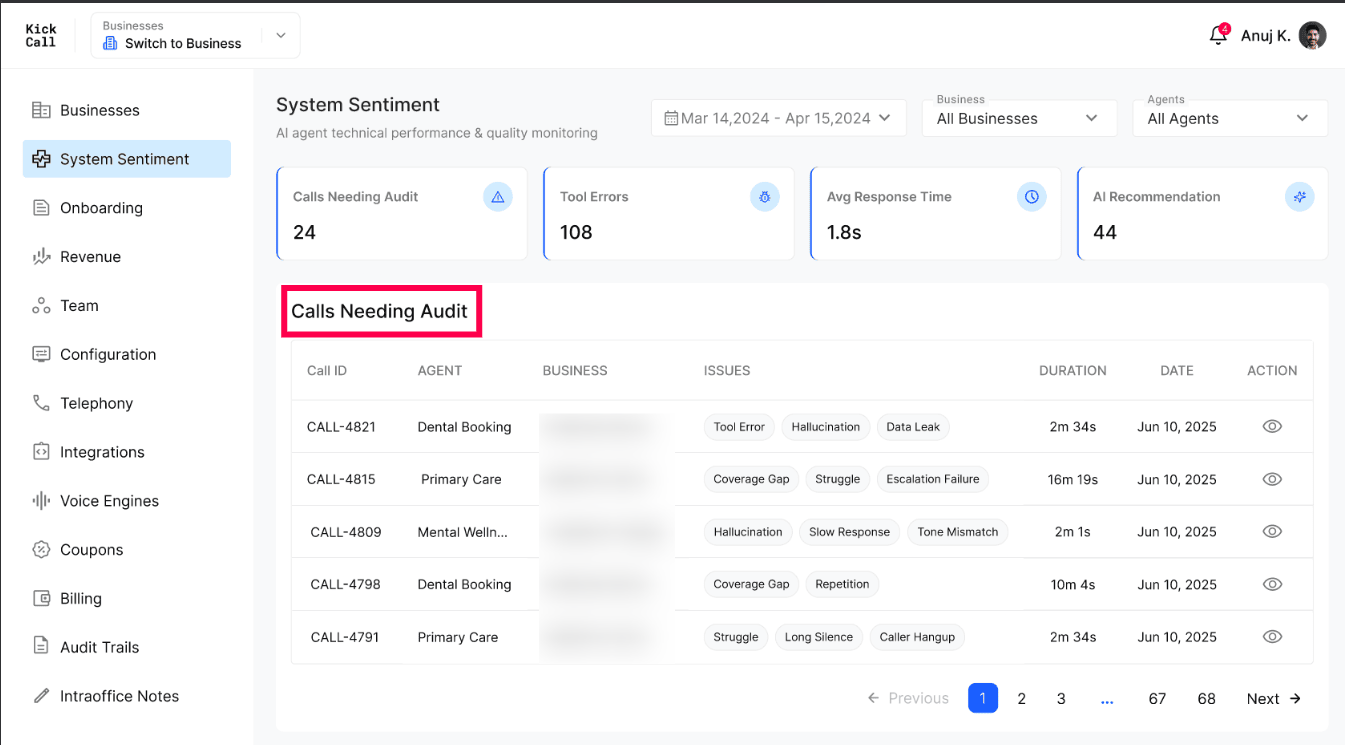
In AI voice, call auditing is one of the most critical activities. It's impractical for a human to listen to every single call, so the system automatically tags the calls that need a closer look. Your team reviews the flagged calls under Calls Needing Audit and decides where the issue lives:
Issue in the agent prompt — fix it directly in the agent's Prompt.
Issue at the system level — report it to Kickcall support.
The agency team can open any reported call from the log and view its full Call Details — agent, business, associated records, recording, transcript, call summary and notes. Under Signals and System, every tag the system applied (for example Tool Error, Hallucination, Data Leak) is shown as a chip. Hover over any tagged keyword to read the description of exactly why the system flagged that tag on this call — so your team knows the reason without guessing.
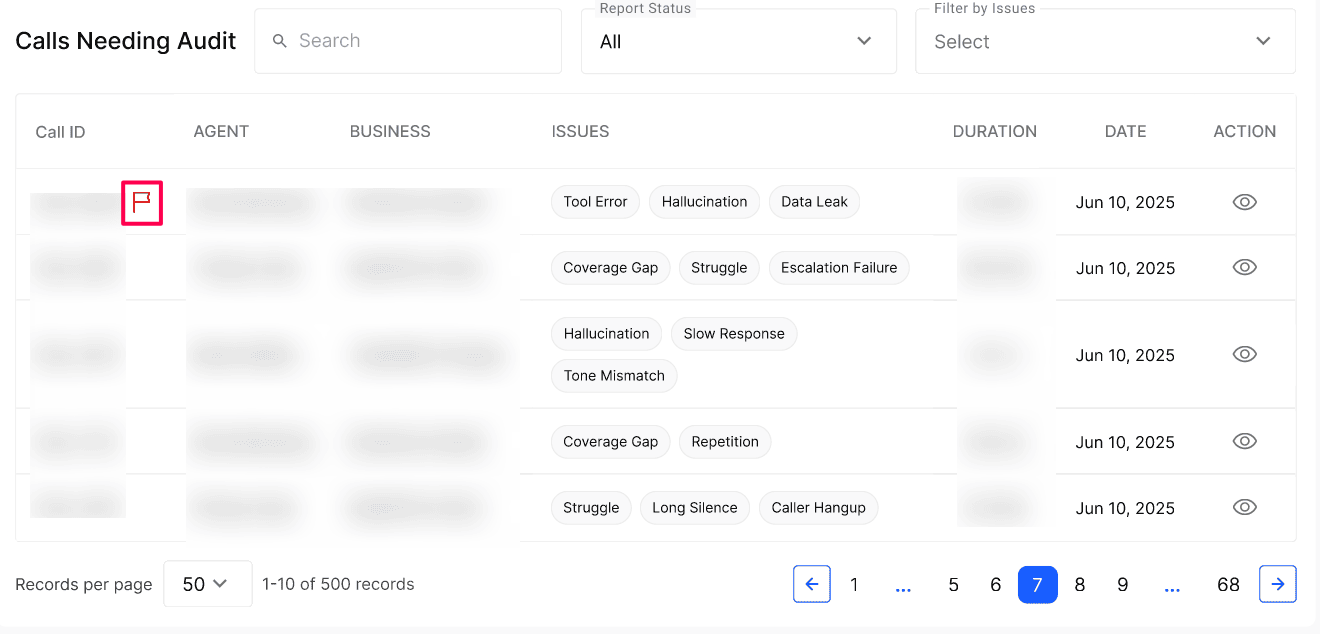
When a business user reports a call from Business Portal → Call Logs, that call is surfaced here as well. Look for the Flagged icon in the Call ID column. A call can be flagged either by Guardian AI or by a user on the business’s team, allowing your agency team to identify and investigate calls that have been specifically flagged for review alongside system-generated issues.
Note: AI behaves like a human. Just as humans make mistakes and occasionally misremember things, AI agents can also make mistakes and hallucinate. The goal of auditing is to catch and correct these cases — not to expect zero mistakes.
Response Time by Tool
Kickcall agents perform read and write actions inside the connected third-party systems (EHR, EMR, PMS, etc.). The Response Time by Tool widget shows the real performance of each Integration's API — average response time and p95 — so you can clearly see which integration is fast and which one is slowing the agent down.
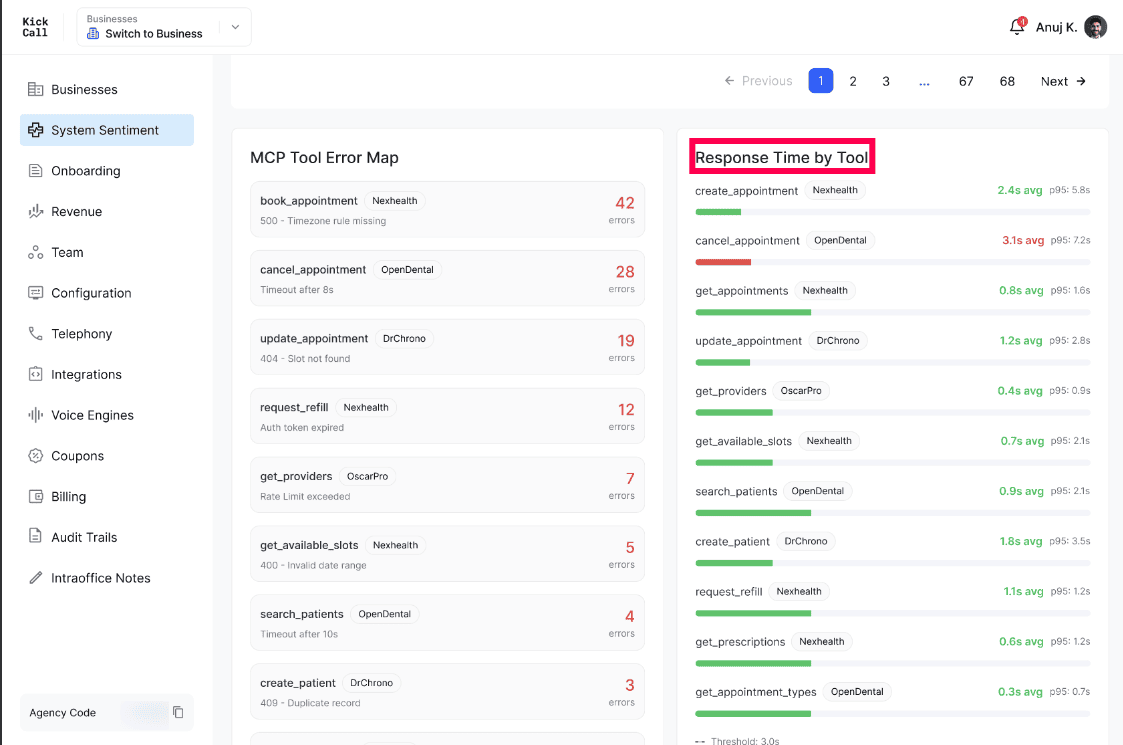
Note: Tool performance depends on the underlying Integration API. If any tool is consistently above a 5 second average response time or showing high latency, report it to Kickcall support.
MCP Tool Errors
MCP tools depend on the data the AI sends to the Integration during a call. Errors typically happen for two reasons:
The AI sent wrong or unaccepted data to the Integration (validation errors).
The Integration itself returned an error — heavy load, request timeout, auth failure, etc.
In either case the tool raises an error which is captured in the MCP Tool Error Map.
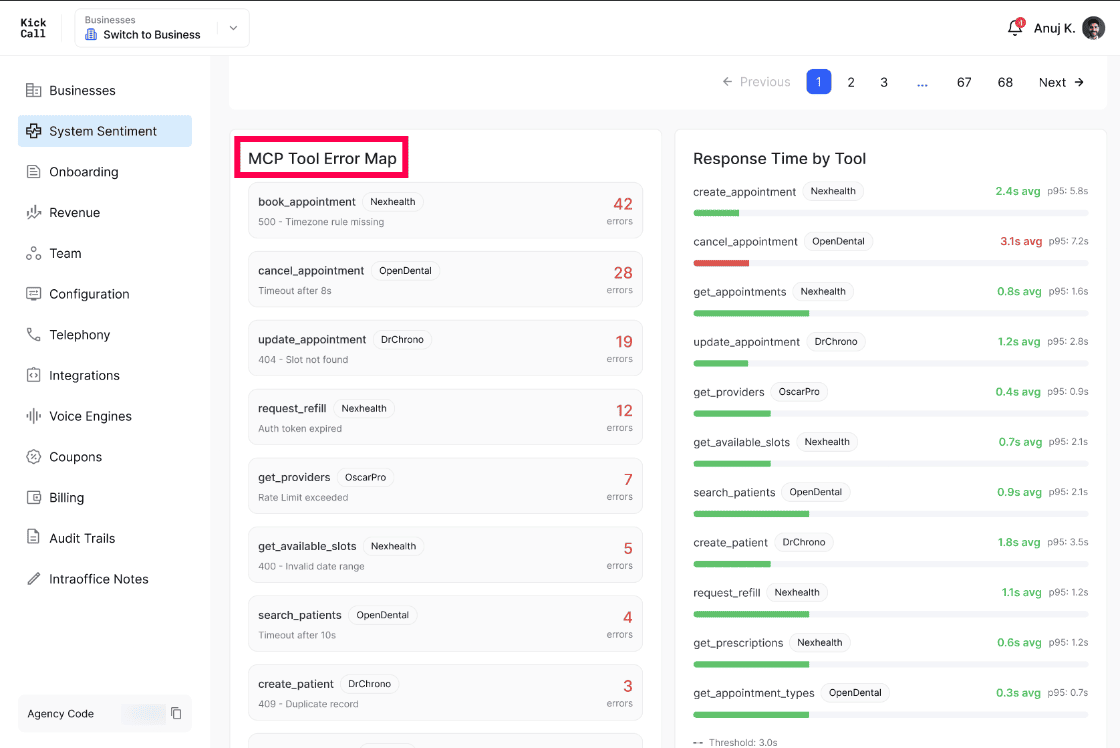
Note: These MCP tool errors are automatically reported to the Kickcall team. You don't need to raise a ticket for them.
Sync Logs
Kickcall syncs contact records from the Integrations connected to each business's agent. Sync runs on a periodic schedule and only for active businesses.
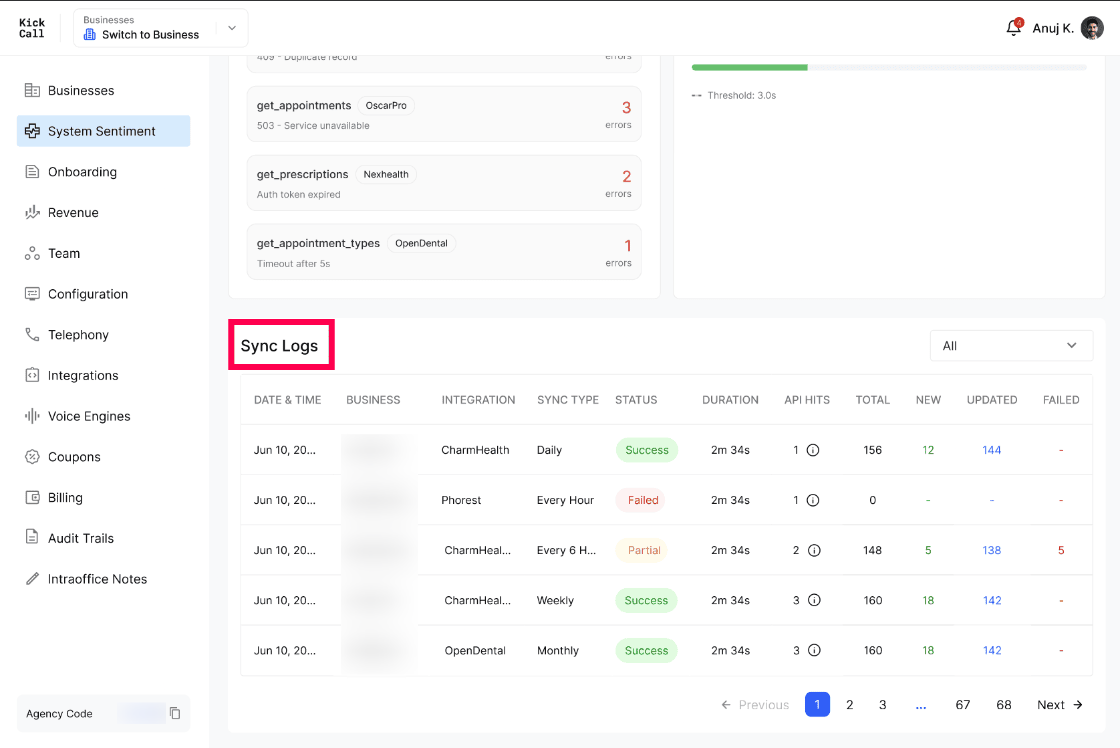
If a sync fails, Kickcall sends an in-app and email notification to both the agency and the business. The most common causes of failure are:
Integration API credentials expired.
The business removed the keys from the Agent-connected Integration.
Note: The first sync must be started manually from Business Portal → Integrations for the relevant Integration. After that, sync runs periodically on its own. If the first sync is missed, the agent may not be able to identify the caller or understand details like email, date of birth, or phone.
Frequently Asked Questions
Which calls show up under "Calls Needing Audit"?
Which calls show up under "Calls Needing Audit"?
Calls automatically flagged by the system for detected issues such as tool errors, hallucinations, data leaks, coverage gaps, struggle, escalation failures, long silences, or caller hangups. Human-flagged calls from the Business Portal are also included.
Can I see calls that a business user reported?
Can I see calls that a business user reported?
Yes. Calls reported from the Business Portal → Call Logs appear in the agency System Sentiment under Calls Needing Audit. They are tagged with Flagged by Human in the Issues column, so your agency team can review them alongside system-flagged calls.
If a call has a problem, how do I know whether to fix the prompt or contact support?
If a call has a problem, how do I know whether to fix the prompt or contact support?
If the agent said or did something wrong because of how it was instructed, fix it in the agent's Prompt. If the agent behaved correctly but the underlying system (telephony, tool, integration) failed, report it to Kickcall support.
A tool's average response time is high. What should I do?
A tool's average response time is high. What should I do?
Most of the time this reflects the Integration's own API speed. If a tool consistently exceeds 5 seconds average or shows high latency, report it to Kickcall support so the team can investigate.
Do I need to report MCP tool errors to Kickcall?
Do I need to report MCP tool errors to Kickcall?
No. MCP tool errors are automatically reported to the Kickcall team. You can monitor them on the dashboard, but no ticket is required.
Why did my sync fail?
Why did my sync fail?
The two most common reasons are expired Integration API credentials and the business removing the API keys from the Agent-connected Integration. Reconnect the Integration from the Business Portal and run sync again.
Does sync run automatically from day one?
Does sync run automatically from day one?
No. The first sync must be started manually from Business Portal → Integrations. After that initial run, sync continues periodically on its own.
What happens if I forget to start the initial sync?
What happens if I forget to start the initial sync?
The agent may not be able to identify the caller, and may miss important caller details like email, date of birth, or phone — because those records were never pulled in.
What does "beta" mean?
What does "beta" mean?
Beta means the feature is live and usable, but it is still being actively developed and refined. Functionality works as documented, however you may see changes, improvements, and additions over time as we incorporate real-world usage and feedback. Some behaviour may evolve before the feature is marked as stable.
What is p95?
What is p95?
p95 (the 95th percentile) means that 95% of requests to the tool completed faster than this value, and only the slowest 5% were slower. It's a better indicator of real-world worst-case performance than the average, because a few very slow calls can ruin the caller experience even when the average looks fine. Watch p95 alongside average response time — a low average with a very high p95 means the tool is usually fast but occasionally very slow.
Was this helpful?
Still need help? Ask the team