What Do Business Onboarding Statuses Mean in Kickcall?
Understand Kickcall onboarding stages from form intake to agent stabilization, distinguish automatic and agency-managed stages, and review status changes
Written By Maruf Ansari
Last updated 6 days ago
When a Business's onboarding stalls or a customer engagement email fires at the wrong moment, the root cause is usually a misunderstood onboarding status. Kickcall moves every onboarding through a fixed sequence of statuses — some updated automatically by the system, others updated manually by your Agency team — so you always know exactly where a Business stands and can trigger the right follow-up at the right time.
Onboarding Statuses Overview
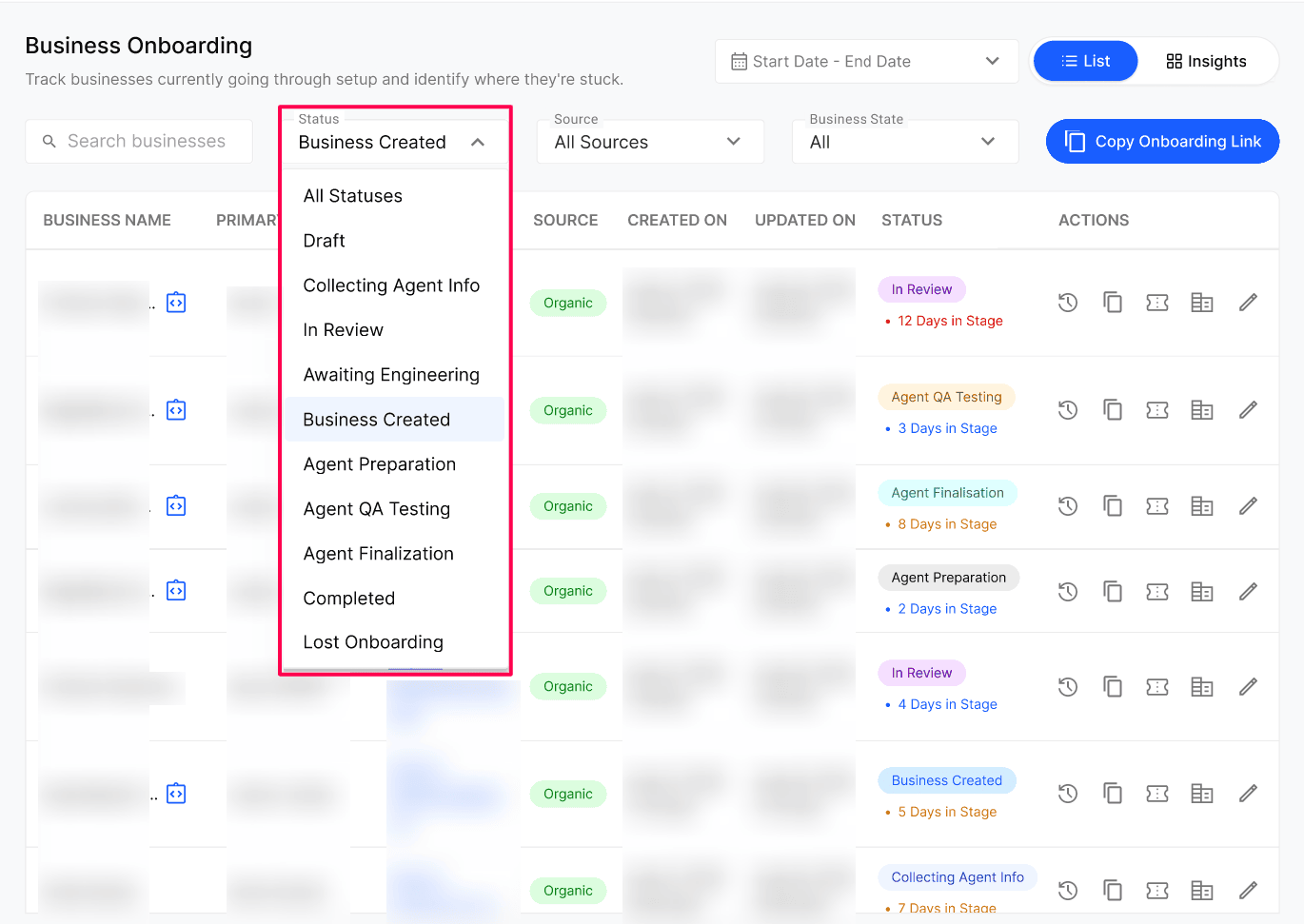
Onboarding Statuses allows Agency administrators and team members to track a Business's progress from the initial onboarding form to a fully operational AI agent. The onboarding process includes 10 statuses, with the first five updating automatically as onboarding steps are completed and the remaining five requiring manual updates during agent preparation, testing, finalisation, and stabilisation. Keeping these statuses updated ensures accurate progress tracking, improves team visibility, and triggers customer engagement automations linked to specific stages.
Important notes
Awaiting Engineering is the only manual status available before Business Setup is completed. Use it to flag that the onboarding is waiting on engineering work. Once the Business is created, this option is no longer available.
(Agent Preparation onwards, including Lost Onboarding) are only enabled once the onboarding reaches Business Created.
Warning — Lost Onboarding is destructive: marking an onboarding as Lost Onboarding immediately and permanently deletes the Business from the Businesses module. The onboarding record itself stays in Onboarding for future reference, but the Business and its configuration are removed. Only use this status when the engagement is truly lost.
Before you start
Access to the Agency Portal Onboarding module.
If you plan to automate customer engagement from status changes, connect the Customer.io integration first.
Status meanings
Why manual statuses matter - automate customer engagement
Your Agency team updates manual statuses from the Internal Process step of the onboarding. This step is enabled only once the onboarding reaches Business Created; before that, the onboarding is still being driven automatically by the system.
The manual statuses are not just for internal tracking. They are useful for automating customer engagement as the agent matures. Kickcall supports the Customer.io third-party integration — you can trigger emails, in-app messages and SMS automatically whenever a Business moves between statuses. Common examples:
When status moves to Agent Preparation, send a welcome email letting the Business know setup has started.
When status moves to Agent QA Testing, notify the Business that internal testing is in progress.
When status moves to Completed, trigger a sign-off email, a CSAT survey or a referral request.
See Configure Customer.io for how to wire these triggers up.
Expected result
Every onboarding shows its current status in the Onboarding list, and the status updates — automatically or manually — as the Business and your Agency team move through each stage. Any Customer.io triggers tied to a status fire when that status is reached.
Verify the result
Open an onboarding's History Log and confirm the status history matches the actions taken (draft, collecting agent info, in review, Business Setup).
After Business Created, open the Internal Process step and confirm the manual status selector is enabled.
If you configured Customer.io triggers, change a status and confirm the expected email, in-app message or SMS is sent to the Business.
Frequently Asked Questions
Which statuses change automatically and which do I update myself?
Which statuses change automatically and which do I update myself?
Payment Pending → Business Created is automatic on the basis of Business and Agency user activities (payment, form submission, review and Business Setup). Everything from Agent Preparation onwards is updated manually by your agency team.
When should I use Awaiting Engineering?
When should I use Awaiting Engineering?
Use it when an onboarding is blocked on engineering work before the Business can be set up — for example a custom integration, a telephony provisioning issue or another technical dependency. It is the only manual status available before Business Setup is completed, and it disappears from the list once the Business is created.
What happens when I mark an onboarding as Lost Onboarding?
What happens when I mark an onboarding as Lost Onboarding?
Three things happen immediately: the status changes to Lost Onboarding, the Business is deleted from the Businesses module, and the onboarding record stays in Onboarding for future reference. Kickcall asks you to type the Business's exact name to confirm before applying the change. Only use this when the engagement is truly lost.
Can I delete an onboarding once payment is confirmed?
Can I delete an onboarding once payment is confirmed?
No. Delete is only enabled in Payment Pending. After that, the record is kept for audit purposes.
Can I trigger customer emails when status changes?
Can I trigger customer emails when status changes?
Yes. Connect Customer.io from the third-party configuration and use the status transitions as triggers for your engagement campaigns.
What happens to the business if I never mark the onboarding as Completed?
What happens to the business if I never mark the onboarding as Completed?
Nothing breaks — the business continues to operate normally. The Completed status is mainly for your own tracking and to drive end-of-onboarding automations.
Related articles
Was this helpful?
Still need help? Ask the team