Business Account Statuses
Written By Anand Raj
Last updated 4 months ago
Every business has an Account Status that controls whether the business can access the platform and whether agents continue to take calls. You'll find the status selector at the top right of the Business Profile Settings page.
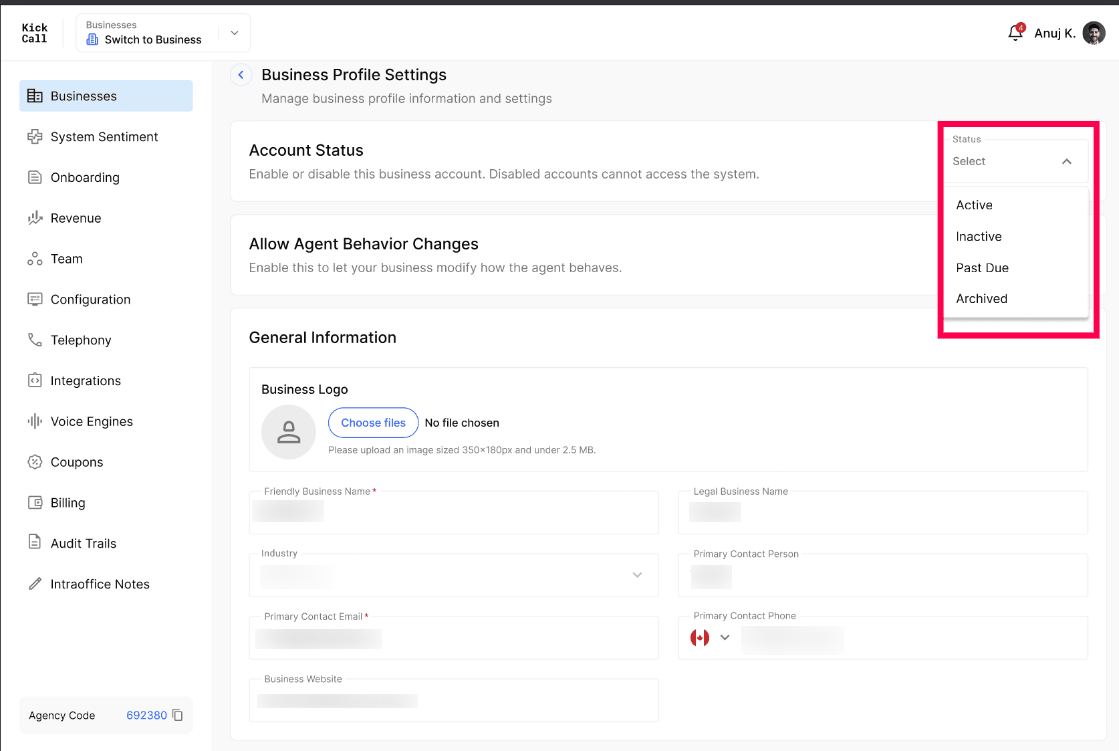
The 4 statuses
1. Active
The business is fully live. All services are running normally and payments are up to date. Agents take calls, integrations work, and the business has full access to the Business Portal.
2. Past Due
Bills are generated for every business on the last day of the month. If the payment is not cleared within 7 days of bill generation, the account automatically moves to Past Due.
Service is paused for the business while in Past Due — agents stop taking calls.
Business users can still log in to the Business Portal, but the system forces them to clear the outstanding payment first — every other module is locked until the bill is paid.
As soon as the payment is cleared, service resumes automatically and the status moves back to Active.
3. Inactive
If the bill remains unpaid through the end of the following month (after Past Due), the account is moved to Inactive.
Business users cannot log in to the system at all.
To restore access, the business must contact the Agency Admin.
At this stage, Kickcall releases the business's integration credentials and phone numbers back to the agency pool.
4. Archived
After 30 days of the account being in inactive status, it is moved to Archived. Archiving permanently disables the business and deletes all of its data. There is no recovery option after this step — call logs, recordings, configurations, knowledge base and audit trails are all removed.
Who controls the status — automatic vs manual
Agencies using Kickcall Stripe Billing
If your agency uses Kickcall's built-in Stripe billing, the system manages these statuses automatically based on payment events (bill generation, payment success, payment failure). The agency can override the status manually from the Status dropdown, but doing so is at the agency's own risk — it can put the system out of sync with billing.
Agencies not using Kickcall Stripe Billing
If your agency handles billing outside of Kickcall, you are responsible for maintaining payment tracking and the business's status manually. Update the status from the dropdown whenever the business's payment situation changes.
Frequently Asked Questions
How long does a business stay in Past Due before moving to Inactive?
How long does a business stay in Past Due before moving to Inactive?
Until the end of the following month. Past Due begins 7 days after bill generation; if the bill is still unpaid by the next month-end, the account is moved to Inactive.
What happens to phone numbers and integrations when a business goes Inactive?
What happens to phone numbers and integrations when a business goes Inactive?
Their integration credentials and phone numbers are released. If the business reactivates later, those numbers and credentials may need to be re-provisioned.
Can I recover a business after archiving it?
Can I recover a business after archiving it?
No. Archiving permanently deletes all data with no recovery option. Use it only when you are certain the business will not return.
Will the business owner be notified when the status changes?
Will the business owner be notified when the status changes?
Yes. Status changes trigger notifications to the business's primary contact so they know why service has paused or resumed.
Should I manually change status if I'm on Kickcall Stripe Billing?
Should I manually change status if I'm on Kickcall Stripe Billing?
Generally no — the system keeps the status in sync with payments. Manual overrides are allowed but use them only when you fully understand the billing impact.
More in Manage Business Details & Configurations:
Was this helpful?
Still need help? Ask the team